


ESPHome firmware for 16 millimetre-wave radar models, targeting ESP32-C3 (ESP32-S3 and other MCUs planned).
Most ESPHome radar components hand Home Assistant the radar's own raw numbers. That works on a bench and falls apart in a house: the coordinates mean nothing until you know exactly how the radar is mounted, and mmWave passes straight through plasterboard, so the radar happily reports your neighbour.
This firmware does two things about that, on the device, before Home Assistant ever sees a value:
- Coordinate transformation — converts radar-local readings into room coordinates, in centimetres from a corner you pick, using the radar's measured position and orientation.
- Boundary filtering — rejects targets outside a polygon you draw around the actual room, which is what stops through-wall ghosts driving presence.
The result is a position you can write an automation against directly.
Beyond the radar's own entities, each build carries the same operational surface — WiFi signal, uptime, online status, IP/SSID/MAC, ESP die temperature, a restart button and a safe-mode restart that boots with everything but WiFi and OTA disabled, for recovering a device that will not otherwise take an update.
There is also a local web UI on port 80, which is the way in when Home Assistant is unreachable and the radar is on a ceiling, and USB provisioning (Improv) that the web flasher above drives.
A Bluetooth proxy is available but off by default: it costs 502 KB of flash
and shares the ESP32-C3's single radio and 320 KB of RAM with WiFi, and the
thing that degrades is the radar's own connection to Home Assistant. Turn it on
deliberately — see tests/common/_bluetooth.yaml.
New to this project? → Getting Started
That guide takes you from a bare board and four jumper wires to a live room map, in about 45 minutes, without writing any YAML. The short version:
-
Wire the radar to an ESP32-C3 — four wires, two of them crossed.
-
Flash from your browser — no software to install:
Requires Chrome or Edge (Web Serial). Firefox and Safari will not work.
-
Install the card so you get a picture instead of numbers:
-
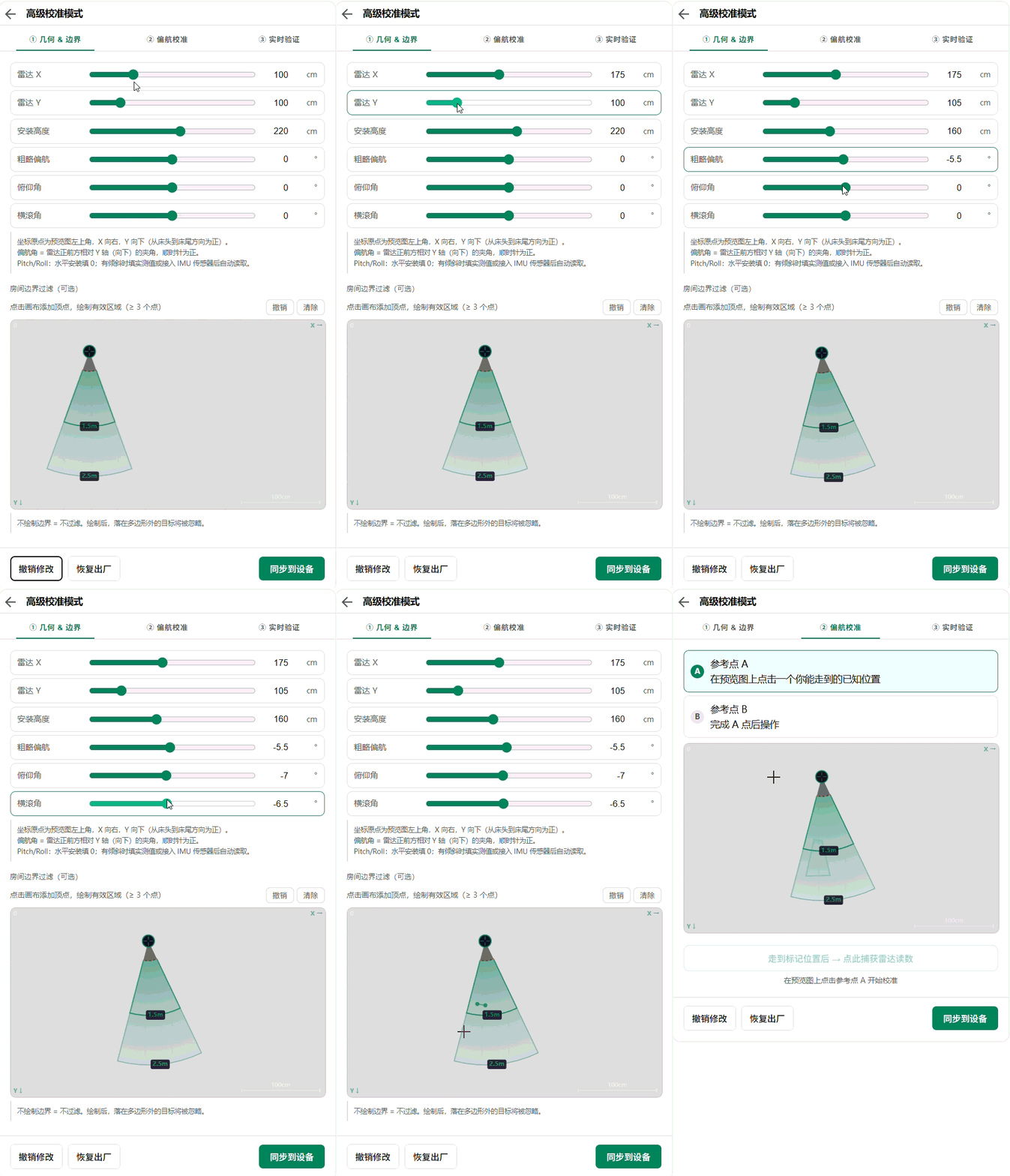
Calibrate in the card's three tabs. Do not skip this — it is what makes the coordinates mean anything.

| If you are | Read |
|---|---|
| Setting this up for the first time | Getting Started |
| Writing your own YAML, changing pins, adding sensors | DIY guide |
| Looking up one model's entities and options | docs/<model>/README.md, linked in the table below |
| Adding a new radar model, or an AI agent working here | AGENTS.md |
| Setting up more than one radar | mmwave-fusion |
This firmware is one of three pieces, released separately:
| Repository | What it is | Needed? |
|---|---|---|
| mmwave-component (this) | ESPHome firmware | Yes — this is the device side. |
| mmwave-card | Lovelace card | Yes in practice — it is the only UI, and calibration happens in it. |
| mmwave-fusion | HA integration | Only for multi-radar fusion. Experimental. |
Home Assistant files a device's entities into four blocks. The split here answers one question: is this the radar's, or is it ours?
| Block | What is in it |
|---|---|
| Sensors | What the radar measures, and the room coordinates derived from it |
| Controls | Everything the radar itself owns — its settings, its operating modes, its query buttons, and its restart and factory-reset actions. The ESP's own restart buttons live here too |
| Configuration | Only what this component adds, under three prefixes: Mount … (where the radar is), Zone … (which region counts as the room), and on 2-D/3-D models Area … (desk / bed / door occupancy) |
| Diagnostic | Only the ESP's own health, plus the frame-injection input tests use: ESP Temperature, IP Address, MAC Address, Mock Data, SSID, Status, Uptime, WiFi Signal. Nothing model-specific belongs here |
So Configuration is the answer to "how is this radar installed, and which part of the room counts?" — nothing in it is a radar setting, and the radar knows about none of it. Every one of those values is applied on the ESP, which is why they survive a radar factory reset and why changing them cannot put the module into a bad state.
Everything the radar itself understands is in Controls, whether it is a gate sensitivity, a tracking mode, or a factory reset.
Two consequences worth knowing:
- The prefixes say who owns the value, which is why they exist.
Mount X/Y/Z,Mount Yaw/Pitch/Rolldescribe where the radar is bolted;Zone Polygon,Zone Min Distance,Zone Max Distancedescribe which part of the room counts;Area N Polygon,Area HysteresisandArea Still Speed(2-D/3-D only) describe sub-room occupancy. Nothing namedMount …,Zone …orArea …is ever sent to the radar. Zone Min/Max Distanceis on all sixteen models and means the same thing on each: a radial gate on how far the target is from the radar, measured in the radar's own frame. Because it is measured there, moving or re-aiming the radar does not change which targets it admits.0switches an end off, and both are0by default on most models — checkZone Max Distancebefore concluding a target is out of range. A target outside the gate is filtered, not dropped:Target N X/YandRoom X/Ykeep tracking it and onlyIn Boundarygoes false. It also clearsPresence, on every model, unless you setboundary_gates_presence: falsein the component config — that is what keeps a target seen through a wall from registering as someone in the room.- That also disambiguates a pair which used to be easy to confuse. On models
exposing both,
Max Detection Distance(Controls) tells the radar what to report, whileZone Max Distance(Configuration) filters what this component accepts from it. - Radar config read-backs (
Gate Sensitivity,Max Moving Gate,Distance Resolution,Firmware Versionand the like) are not diagnostics — they are the radar reporting its own settings, so they sit with the rest of the radar's data rather than beside the ESP's uptime. Home Assistant files read-only entities under Sensors and only controllable ones under Controls, so a read-back lands in Sensors while the control that writes it is in Controls. That pairing is deliberate: the control shows what you asked for, the read-back shows what the radar actually replied, so a failed write is visible instead of silent. Restart ESPandRestart (Safe Mode)are moved out of Configuration deliberately, which overrides theentity_category: configthat ESPHome's ownrestartandsafe_modeplatforms set by default. They restart hardware; they do not configure anything.
| Entity | Restarts / resets |
|---|---|
Restart ESP |
the ESP32 board. ESPHome's own restart button |
Restart (Safe Mode) |
the ESP32, with everything but WiFi and OTA disabled — the recovery path when a radar component wedges the device |
Restart Module |
the radar module over UART. The ESP keeps running |
Factory Reset |
the radar module's own settings. It does not touch the ESP or its ESPHome configuration |
Nothing here factory-resets the ESP; reflashing is the only way to do that.
Important
Changing an entity's block needs more than a reflash. Home Assistant
stores entity_category in its entity registry when the entity is first
registered, and a device reporting a new value does not overwrite it. Flash
the firmware and the device page looks exactly as it did before.
Reload the device's config entry afterwards — in the UI, or:
service: homeassistant.reload_config_entry
data:
  entity_id: text.<device>_mock_data   # any entity on that device
This bites hardest because the symptom is nothing happening at all, and
/api/states cannot show you the problem: it does not return
entity_category. Checking whether the change actually landed means reading
the entity registry over the WebSocket API
(config/entity_registry/list), not the REST states endpoint.
One idea has one name on every model, and the display name is Title Case
throughout — a device page no longer mixes target_1_x with Radar X. Home
Assistant sorts entities by name inside each block, so consistent names are
also what makes the ordering consistent; there is no separate ordering control.
Names carry which layer they come from:
| Reads like | Comes from |
|---|---|
Target N … |
one tracked target, straight from the radar |
Target N Room … |
the same target after this component's transform |
Mount … |
where the radar is installed — this component, not the radar |
Zone … |
the room region this component filters on |
ESP …, Restart ESP |
the ESP32 board, not the radar |
All 16 models below have a component and firmware config. The Docs column
links model-specific entity and configuration reference where it has been
written.
| Radar Model | Status | Dimension | Targets | Baud | Application | Docs |
|---|---|---|---|---|---|---|
| R60ABD1 | ✅ Completed | 3D (X, Y, Z) | 1 | 115200 | Breathing & sleep monitoring, presence, heart rate | Docs |
| LD2450 | 🔧 Developing | 2D (X, Y) | 3 | 256000 | Multi-target tracking, speed, presence | Docs |
| LD2452 | 🧪 Testing | 2D (X, Y) | 3 | 9600 | Multi-target tracking, fusion testing | Docs |
| LD2453 | 🔧 Developing | 2D (X, Y) | 3 | 256000 | Multi-target tracking, presence | Docs |
| LD2454 | 🧪 Testing | 2D (X, Y) | 3 | 256000 | Multi-target tracking, fusion testing | — |
| LD2451 | 🧪 Testing | 2D (polar) | 3 | 115200 | Multi-target tracking, presence | Docs |
| LD6002 | 🔧 Developing | 1D (range) | 1 | 1382400 | Breathing, heart rate, presence | Docs |
| LD2410 | 🔧 Developing | 1D (range) | 1 | 256000 | Presence/motion, per-gate energy | — |
| LD2410B | 🧪 Testing | 1D (range) | 1 | 256000 | Presence/motion detection | Docs |
| LD2410C | 🧪 Testing | 1D (range) | 1 | 256000 | Presence/motion detection | Docs |
| LD2411 | 🔧 Developing | 1D (range) | 1 | 115200 | Presence/motion detection | Docs |
| LD2411S | 🔧 Developing | 1D (range) | 1 | 256000 | Presence/motion + micro-motion | Docs |
| LD2412 | 🔧 Developing | 1D (range) | 1 | 115200 | Presence/motion, 14 gates, ambient light | Docs |
| LD2420 | 🔧 Developing | 1D (range) | 1 | 115200 | Presence/motion, 16 gates, threshold calibration | Docs |
| LD2450A | 🔧 Developing | 1D (range) | 1 | 256000 | Ranging + gesture recognition | — |
| RD03E | 🔧 Developing | 1D (range) | 1 | 256000 | Precise ranging, presence/motion (0.3–6 m) | Docs |
Only 2-D and 3-D models can take part in multi-radar fusion — a range-only radar reports distance without direction, so there is nothing to fuse.
| Status | Description |
|---|---|
Planned |
Documentation staged; component not yet generated. |
Developing |
Component generated; undergoing on-hardware firmware tests. |
Testing |
Firmware validated; undergoing Home Assistant integration tests. |
Completed |
HA integration validated and stable. |
Paused |
Blocked by an external condition (no hardware, no test environment). |
This table is the authoritative source of truth, updated on every status change.
MIT